Passenger guidance from the moment they land
GlidePath Air Navigate turns any modern smartphone into an indoor positioning device — no app, no pairing, no setup. Passengers scan their boarding pass and receive turn-by-turn directions to their gate, updated live as they move.
Three steps from terminal door to gate
The entire passenger experience is designed around one principle: get out of the way. Navigation should be invisible, accurate, and instant.
Scan the boarding pass
Passengers scan their boarding pass QR code — physical or digital. GlidePath Air reads the flight number, looks up the gate, and builds a route. No forms, no typing, no account needed.
Positioning anchors
The phone's sensors — accelerometer, compass, gyroscope — are fused into a continuous position estimate. QR codes at key terminal locations provide instant recalibration when passed. No BLE infrastructure needed.
Walk. Follow. Arrive.
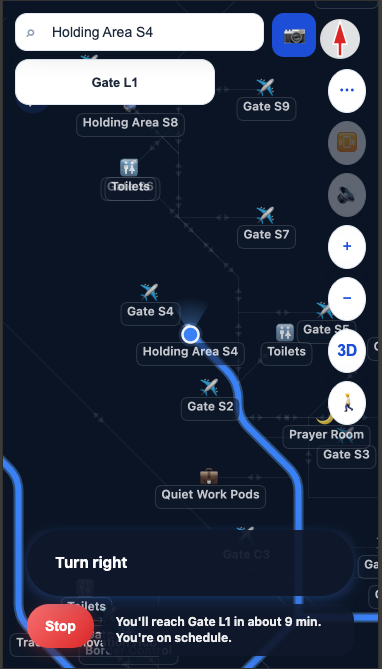
Turn-by-turn instructions display as the passenger moves. The system detects floor changes, reroutes around closed paths, and alerts on gate changes — all without any passenger action.
The question every passenger is asking
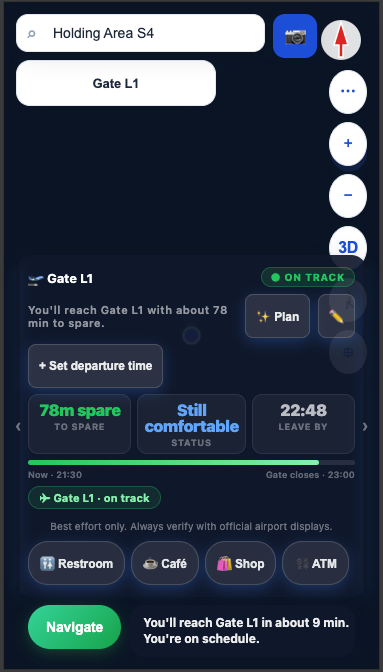
"Will I make my flight?" GlidePath Air's Gate Mode answers it in real time — displaying a live countdown, walking ETA, and boarding status with a single glance.
When a passenger is on track, the panel stays calm and green. When time gets tight, it escalates — colour, haptics, and voice — without ever requiring the passenger to act.
Live Walking ETA
Distance and walking time to gate, updated continuously. Automatically adjusts for detours, lift waits, and pace changes.
Gate Change Alerts
When the airline changes the departure gate, GlidePath Air pushes a notification and recalculates the route automatically. Passengers don't need to check the board.
Boarding Status
Real-time boarding phase displayed in the HUD — gate open, boarding started, final call. Passengers always know exactly where they stand.
Security & Checkpoint Alerts
Before a passenger reaches a security checkpoint or passport control queue, GlidePath Air surfaces an advance alert — reducing last-minute surprises that cause missed flights.
Everything that's working today
Honest list. The "Built today" group is in the code right now and tested in field. The roadmap group is designed but not implemented yet.